Modern workplaces depend on dozens of systems working quietly in the background. Employees need to move between meetings, access different areas of a building, collaborate with colleagues, and complete routine tasks without unnecessary interruptions.
When these everyday processes rely heavily on phone calls, spreadsheets, manual updates, or disconnected systems, small inefficiencies can accumulate. A delayed service request or unclear maintenance schedule may seem insignificant on its own, but repeated friction can affect how smoothly an entire workplace operates.
Smart workplace technology aims to reduce these unnecessary steps. Instead of making employees or facility teams repeatedly search for information, the right systems can bring operational data, schedules, alerts, and workflows into a more organized environment.
How Lift Management Software Reduces Everyday Operational Friction
One area where this approach can be particularly useful is building transportation.
In offices, residential buildings, hotels, hospitals, and commercial facilities, lifts are part of the everyday movement of people and materials. When maintenance information is scattered across different systems, facility teams may spend unnecessary time coordinating service visits, checking equipment records, or following up on unresolved issues.
Lift management software can centralize many of these activities within a digital system.
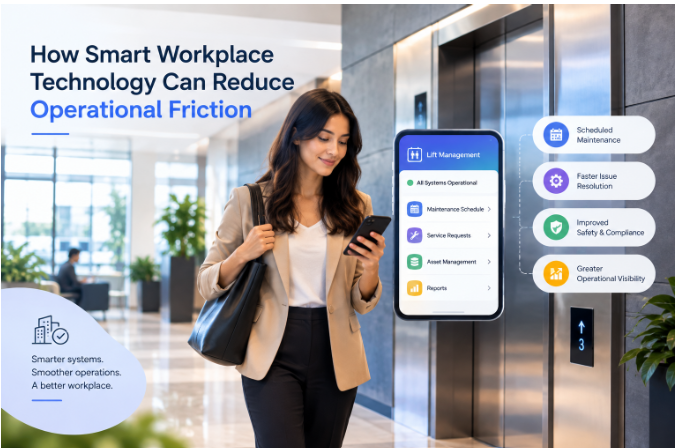
Depending on the platform, this can include maintenance scheduling, asset records, service history, work orders, technician assignments, compliance documentation, and customer communication. Modern lift-management systems can also connect scheduling, inventory, field operations, and reporting rather than keeping each process separate.
The benefit is not simply automation. It is the reduction of repeated coordination.
Turning Maintenance Into a More Predictable Process
Unexpected equipment problems can disrupt employees, visitors, tenants, and facility teams.
Preventive maintenance helps organizations move from reacting to problems toward planning maintenance activities in advance. Digital systems can make scheduled inspections, recurring maintenance, and service reminders easier to track.
For example, a facility manager might need to monitor several lifts across different buildings. Instead of checking separate spreadsheets or contacting technicians individually, a centralized system can provide a view of upcoming work and outstanding tasks.
Some modern platforms provide recurring maintenance schedules, work-order tracking, asset histories, and alerts for upcoming activities.
This can reduce the administrative burden surrounding routine maintenance while giving teams greater visibility into what needs attention. For businesses managing renovation or facility maintenance projects, proper waste disposal is essential for keeping worksites organised. Professional, reliable skip bin hire services in Perth for businesses can help manage project waste efficiently.
Connecting Field Teams With Office Operations
Another source of operational friction is the gap between field workers and office staff.
A technician may identify an issue on-site, while an administrator is responsible for updating records, scheduling follow-up work, communicating with a customer, and tracking parts. When information has to pass manually between several people, errors and delays can occur.
Digital workflows can connect these activities.
A technician can receive an assigned job, update its status, record service information, and attach relevant documentation. Office teams can then access those updates without waiting for a separate phone call or manually recreating the information.
This type of workflow is becoming common across specialized maintenance software, where mobile field tools connect service records with centralized operational systems. Short recorded videos cut a lot of meeting friction too. A two-minute walkthrough replaces a 30-minute call, which is why so many software teams now explain their products with video. This guide to explainer videos for SaaS covers how to do it well.
Why Centralized Information Matters
Operational friction often comes from information being available but difficult to find.
A maintenance history might exist in an old spreadsheet. A service contract could be stored in an email. A technician’s latest update might be in a messaging application.
Each piece of information may be useful individually, but the lack of connection between them makes decision-making harder.
A centralized system can bring information together around the relevant asset.
For a lift, that might include:
- Equipment specifications
- Installation information
- Maintenance history
- Service requests
- Upcoming maintenance
- Technician assignments
- Parts used
- Compliance records
- Customer information
This creates a more complete operational picture and reduces the need to repeatedly collect the same information.
Scheduling Can Remove Unnecessary Coordination
Scheduling is another area where workplace technology can reduce friction.
Maintenance teams often need to coordinate technicians, equipment availability, building access, customer requirements, and service priorities. Manual scheduling can become increasingly difficult as the number of buildings and assets grows.
Digital scheduling tools can provide a shared view of upcoming jobs and technician availability.
Some lift-management platforms also support technician dispatch, appointment scheduling, live job updates, and location information.
The objective is not simply to create a digital calendar. A useful scheduling system connects appointments with the wider workflow so that the people responsible for the work can see what needs to happen and when.
Lift Software Development Is Moving Toward Connected Workflows
The development of specialized workplace technology is also changing.
Traditional software might address one isolated task, such as scheduling or customer records. Newer systems increasingly connect multiple operational functions.
This is where lift software development can extend beyond creating a basic maintenance application. Developers can build systems that connect asset management, field operations, customer communication, scheduling, inventory, reporting, and compliance into a single workflow.
For example, when a technician completes a maintenance task, the system could update the equipment record, create a service history entry, notify relevant staff, and trigger the next scheduled activity.
This reduces the number of times information needs to be manually entered.
Companies such as Triple Minds operate in the broader software-development space, where specialized business applications can be designed around particular operational requirements. The more important principle, however, is that workplace software should solve a clearly defined workflow problem rather than simply add another dashboard.
Automation Should Support People, Not Overcomplicate Their Work
Automation is often presented as the answer to operational inefficiency, but poorly designed automation can create new friction.
If employees receive too many alerts, have to navigate complicated dashboards, or are required to update the same information in multiple places, a supposedly smart system can become another source of work.
Good workplace technology should therefore make common actions easier.
For example, an employee should not need to understand the underlying software architecture to report a problem. A technician should not have to complete unnecessary forms to close a routine task.
The best workflows often involve fewer steps rather than more features.
Data Can Help Facilities Make Better Decisions
Digital systems also create an opportunity to understand recurring operational patterns.
When service information is consistently recorded, facility teams can examine questions such as:
- Which equipment requires frequent repairs?
- Which maintenance tasks are regularly delayed?
- Which locations generate the most service requests?
- How long does it take to resolve different types of issues?
- Which parts are used most frequently?
- Are scheduled maintenance activities being completed on time?
These insights can support better planning.
Instead of relying entirely on memory or isolated reports, managers can use historical information to identify recurring issues and prioritize resources. Developing the ability to analyze historical and real-time data can open up new career opportunities, and a Data Science Course can help learners build practical skills in data analysis, visualization, and machine learning.
Workplace Technology Can Support a More Focused Environment
The connection between operational technology and workplace focus is easy to overlook.
Employees do not necessarily experience operational inefficiency as a software problem. They experience it as interruptions.
A meeting is delayed because an elevator is unavailable. A facilities employee spends part of the morning chasing a technician for an update. A building manager searches through emails for a previous service report.
Each interruption takes attention away from the person’s primary responsibilities.
Reducing these interruptions does not require every workplace process to become automated. It requires routine information and workflows to become easier to manage.
That is where smart workplace technology can have a practical impact.
Watch: How Technology Can Improve Operational Workflows
For another perspective on using technology to make business processes more efficient, this video can provide additional context:
Security and Access Should Be Part of the Design
As workplace systems become more connected, security becomes increasingly important.
Maintenance records, customer information, employee details, building information, and operational data may all exist within the same environment.
Organizations should therefore consider:
- Role-based access
- Secure authentication
- Data backups
- Activity logs
- Permission management
- Secure integrations
- Regular software updates
Different users may need different levels of access. A technician, facility manager, administrator, and customer should not necessarily see the same information.
Security should therefore be considered during product design rather than added after the system has already been deployed.
The Human Side of Workplace Automation
Technology works best when employees understand why it is being introduced.
A new system may offer extensive functionality, but adoption can suffer if workers find it difficult to use or do not understand how it improves their daily responsibilities.
Organizations should therefore introduce new technology around real workflows.
Training should focus on practical questions:
What problem does this solve?
What task becomes easier?
What information is now available in one place?
What no longer needs to be done manually?
These questions help employees connect technology with their actual work rather than seeing it as another software requirement.
Building a Less Friction-Filled Workplace
Smart workplace technology does not need to make every process complex or completely automated.
Its purpose is simpler: remove unnecessary steps from routine activities.
For facility operations, that could mean making maintenance schedules easier to manage. For technicians, it could mean receiving clearer job information. For managers, it could mean having a reliable view of equipment and service history.
For employees, the result may simply be fewer interruptions during the working day.
As workplace systems become more connected, organizations have an opportunity to design technology around the way people actually work rather than forcing people to adapt to disconnected tools.
Final Thoughts
Operational friction rarely comes from one major problem. It often develops through a collection of small inefficiencies—manual updates, repeated communication, scattered information, unclear schedules, and unnecessary administrative tasks.
Smart workplace technology can help address these problems by connecting information and making routine workflows more predictable.
The goal should not be technology for its own sake. A useful system is one that quietly removes obstacles, gives people the information they need, and allows them to spend more attention on work that actually requires their time.
When technology is designed around people rather than simply around features, even routine workplace operations can become easier to manage.
Frequently Asked Questions
Smart workplace technology refers to digital systems that help organizations manage everyday workplace operations more efficiently. These can include facility-management systems, maintenance software, scheduling tools, automation platforms, communication systems, and connected building technologies.
Lift management software is a digital system designed to help manage lift or elevator-related operations. Depending on the platform, it can support maintenance scheduling, service records, work orders, technician dispatch, asset management, compliance documentation, and reporting.
It can bring maintenance schedules, equipment records, service requests, technician information, and other operational data into one system. This can reduce repeated communication and make it easier for teams to track ongoing work.
Lift software development involves designing and building digital applications for lift and elevator businesses or facility operators. These applications can include features for maintenance, scheduling, asset management, field service, customer communication, inventory, and reporting.
It can help reduce interruptions caused by inefficient administrative processes. When routine tasks and information are easier to manage, employees may spend less time searching for updates or coordinating repetitive activities.