
Most app blockers sell toughness. Locks you can’t break, sessions you can’t end, keys you have to walk across the house to find. Jomo goes the other way. Its name stands for “joy of missing out,” and its pitch is friendly: block apps by default, then let yourself in on purpose.
That raises a fair question. If you can always take a break, does the block do anything at all?
There’s reason to think it can. In a PNAS study of a pause-before-opening app, a short delay cut app openings by 57% over six weeks. Gentle friction worked. But that only holds if the friction is real.
So we used the Jomo app for two weeks, logged the numbers, and compared it with its strictest rival, Opal.
Quick Takeaways
- Jomo blocks apps and websites on iPhone, iPad and Mac through Apple’s Screen Time system. There’s no Android version.
- Its standout feature is customizable “breaks”: you can add a delay, ask yourself why, or cap how many breaks you get per day.
- The free version allows one session. Jomo Plus costs $29.99 a year in the US, roughly a third of Opal Pro.
- In our two-week test, [FILL: one-line result, e.g. “social media time fell by X% and pickups by Y%”].
- Gentle blocking works if you set limits on your breaks. Unlimited, instant breaks barely change anything.
What Is Jomo?
Jomo is a screen time and app-blocking app made by Jomo SAS, a small European company. Its App Store listing describes the team as two people with no outside funding, and the app launched in 2022.
It runs on iPhone and iPad (iOS 16 or later), Mac (macOS 13 or later), and Apple Vision Pro. It uses Apple’s Screen Time framework to block apps, which means blocks apply system-wide rather than only inside one browser.
On Mac, Jomo can also block websites in Safari, Chrome, Arc, Opera, Edge and Brave, along with desktop apps like Mail or Slack.
What sets Jomo apart from stricter tools is its philosophy. Rather than locking you out, it asks you to choose how much friction you want, and when.
How Jomo’s Gentle Blocking Works
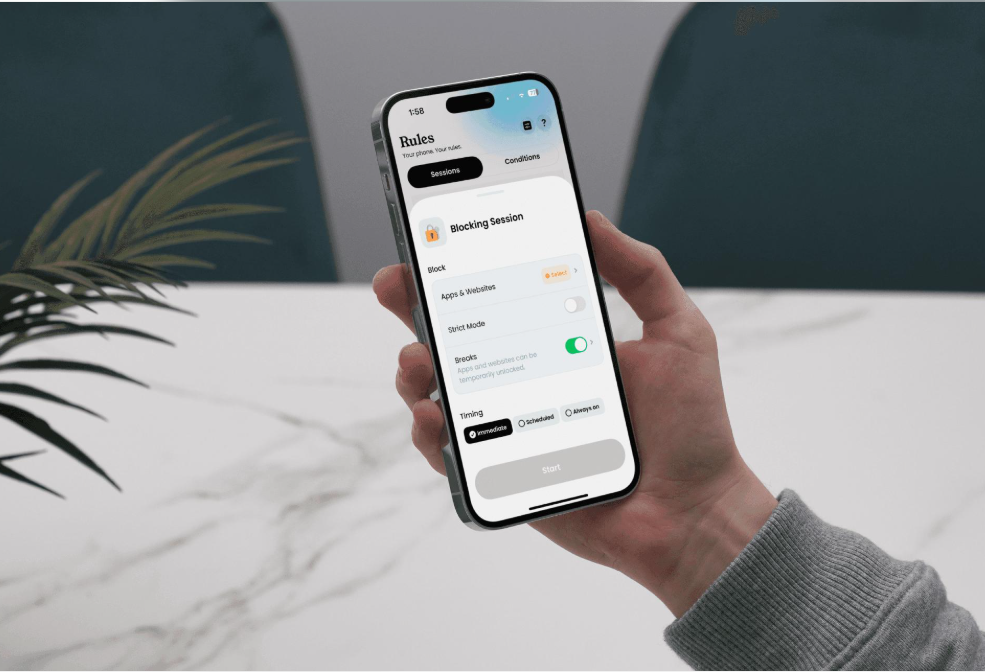
Jomo has two kinds of rules: Sessions and Conditions. Both can be softened or hardened with Breaks and Strict Mode.
Sessions
Sessions block apps for a set period: right now, on a schedule, or all the time. The free version allows one session. Jomo offers templates to start from:
- Conscious Use: apps stay blocked by default. To use one, you take a timed break, and Jomo re-blocks it when time runs out.
- Wind Down: blocks apps overnight.
- Deep Work: a short, focused block.
- Brick Mode: blocks everything except essentials like Phone and Messages.
Conditions
Conditions block or unblock apps based on what you do. According to Jomo’s own guide, options include daily app limits, a cap on how many times you open an app, a total screen time budget, and “Good Apps First,” where time in one app (say, a reading app) unlocks another. There are even step-based rules that make you walk before you scroll.
Breaks: Where “Gentle” Lives
Breaks are what make Jomo gentle, and they’re highly adjustable. You can:
- Limit the number of breaks per day, or allow unlimited ones.
- Add friction before each break: a fixed or growing delay, a prompt to state your intention, or a random code to type.
- Force a gap between breaks so you can’t chain them back to back.
Strict Mode
When you want less give, Strict Mode stops you from deleting a rule while it’s active. It can run only during a session, until a set date, or always. Always-On mode can be removed only with a code, which you can hand to a friend.
Our Two-Week Jomo Test
Editor’s note: this section needs real test data before publishing. The structure and setup below are final. Replace every [FILL] with numbers from an actual two-week test on one phone, using iPhone Screen Time as the source of truth.
Tester and setup: [FILL: tester, iPhone model, iOS version]. Apps targeted: [FILL: e.g. Instagram, TikTok, YouTube]. We measured three numbers from iPhone Screen Time each day: total screen time, time in the targeted apps, and pickups. We also logged every Jomo break taken, and every break we started but abandoned.
- Baseline (3 days before Jomo): no changes, just Screen Time logging.
- Week 1 (gentle): one Conscious Use session on the target apps. Unlimited breaks, each with a 10-second delay.
- Week 2 (firmer): same session, but breaks capped at 5 per day, a progressive delay, a 30-minute gap between breaks, and Strict Mode While Blocking.
What we noticed: [FILL: 3 to 5 short observations, for example: the hours when breaks clustered; whether the delay screen led to abandoned breaks; whether Week 1 felt too easy; any bugs or blocks that didn’t trigger; how Strict Mode felt in practice.]
To read your own numbers the same way, see our guide to your screen time report.
Does Gentle Blocking Actually Work?
The research suggests the answer depends on how gentle you go. In the PNAS study, it was the waiting time that cut app openings, not the reflective message on its own. A reminder you can wave away doesn’t change much. A few seconds of real delay does.
Jomo’s breaks map neatly onto that finding. A break with a growing delay, a daily cap, and a gap between breaks is real friction. A break with no delay and no limit is just an extra tap.
That’s also why gentle tools suit some people better than strict ones. A hard lock that blocks your banking app at the wrong moment often gets deleted in frustration. A gentle block you’ll keep running for months does more good than a strict one you uninstall in a week. This is the same thinking behind ComfortZoneCheckin: a short pause at the moment you drift, rather than a wall.
The weak spot is self-control at setup time. Jomo lets you make breaks as easy as you like, and on a bad day you might. Strict Mode exists to protect you from that version of yourself.
Jomo Pricing
Jomo’s free version gives you one session, which is enough to test the Conscious Use approach. Jomo Plus unlocks unlimited sessions and the rest of the features. US prices on the App Store, checked in October 2026:
| Plan | US price |
| Free | $0 (one session) |
| Jomo Plus, monthly | $5.99 |
| Jomo Plus, yearly | $29.99 (3-day free trial) |
| Jomo Plus, lifetime | $99.99 one-time |
| Jomo Plus Family | $11.99/month or $59.99/year |
| Student | $14.99/year (application required) |
Prices vary by country. The Canadian App Store, for example, lists the yearly plan at $39.99 in Canadian dollars, so check your local listing.
Jomo vs Opal
Opal is the best-known strict alternative, so it’s the natural comparison. We cover it in depth in our Opal app review.
| Feature | Jomo | Opal |
| Philosophy | Gentle, configurable friction | Strict focus sessions |
| Hardest mode | Strict Mode (Always-On, code to remove) | Deep Focus (can’t end a session early) |
| Ways out of a block | Breaks with delays, intention prompts, random codes, daily caps | Standard sessions can be ended; Deep Focus sessions can’t |
| Platforms | iPhone, iPad, Mac, Vision Pro | iPhone, Mac, Android, Chrome |
| Free version | One session | Basic blocking, limited sessions |
| Paid price (US) | $29.99/year | About $99.99/year |
| Best for | People who quit strict blockers | People who need a wall during work |
The short version: Opal is stronger for focused work blocks. Jomo is more flexible and far cheaper. If you use Android, Jomo isn’t an option.
Jomo Pros and Cons
Pros
- One of the most configurable break systems on iPhone.
- Creative rules like Good Apps First and step-based unlocks.
- Strict Mode is there when gentle isn’t enough.
- Affordable, with a lifetime option.
- Mac website blocking across major browsers.
Cons
- No Android version.
- Flexibility means easy-mode setups are possible, and tempting.
- The free version allows only one session.
- So many options can feel like a lot at first.
Who Should Use Jomo?
Jomo suits iPhone and Mac users who have tried strict blockers and given up on them. If a hard lock makes you anxious or gets uninstalled within a week, Jomo’s breaks let you stay in control without giving the habit a free pass.
It’s less suited to people who already know they’ll set unlimited, instant breaks. If that’s you, either turn on Strict Mode from day one or choose a stricter tool. For a wider comparison, see our roundup of the best digital wellbeing apps or our list of the best app blockers for iPhone.
FAQ
Yes, with limits. The free version includes one blocking session. Jomo Plus, from $5.99 a month or $29.99 a year in the US, unlocks unlimited sessions and the full feature set.
No. Jomo is available only on Apple devices: iPhone, iPad, Mac and Apple Vision Pro.
Jomo says it uses only Apple’s Screen Time framework to block apps and view usage, which limits what any blocker can see. Check the App Store privacy section for the latest details.
Choose Opal if you need sessions you truly can’t end, or if you use Android. Choose Jomo if you want flexible, friendlier friction at a lower price.